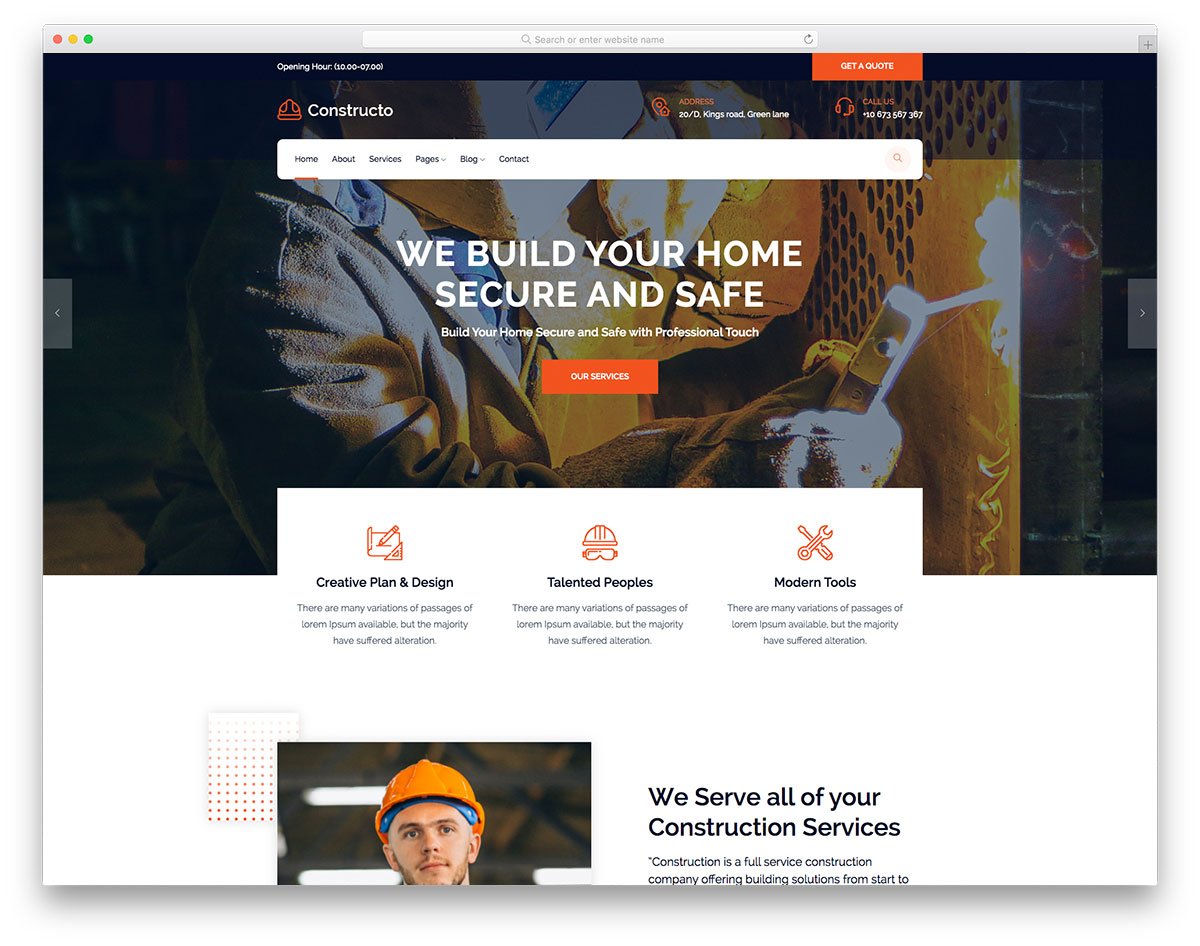
Best Web Templates for Construction Companies in 2024
When you’re scouting for construction company web templates, the goal isn’t just a flashy design—it’s a site that showcases heavy‑duty projects while staying easy to navigate for clients and subcontractors alike. Over the past year, a handful of template families have earned a reputation for blending robust visual language with the practical features that construction firms need every day. Below you’ll find a curated look at those options, plus tips on tailoring them to your brand’s unique blueprint.
What Makes a Construction Company Template Stand Out
Unlike generic business sites, a construction‑focused template has to juggle a few specific demands. First, the layout must highlight large‑scale imagery—think high‑resolution project photos or drone footage—without sacrificing load speed. Second, clear calls‑to‑action (CTAs) for “Request a Quote” or “View Portfolio” should be placed where they’re impossible to miss. Third, the template should support project‑tracking tools such as progress timelines, equipment galleries, and even basic job‑site maps.
Other subtle but important features include:
- Responsive grids that adapt to tablets on‑site and desktops in the office.
- Integrated contact forms that can capture lead details directly into popular CRMs.
- Pre‑built sections for certifications, safety records, and client testimonials—information that builds trust in a heavily regulated industry.
Top Picks for Ready‑Made Templates
Each of the following templates is available on major marketplace platforms and comes with a solid support record. They’ve been chosen for design flexibility, construction‑specific modules, and overall value.
1. BuildPro – Multi‑Purpose Construction Theme
BuildPro offers a bold, masonry‑style homepage that immediately draws eyes to recent projects. Its built‑in portfolio filter lets visitors sort by project type—commercial, residential, or infrastructure—without a plugin.
- Pros: Extensive demo content, Gutenberg‑compatible, and includes a live‑chat widget.
- Cons: Slightly heavier on scripts, which may need optimization for slower connections.
2. ContractorX – Clean Corporate Layout
If you prefer a more corporate aesthetic, ContractorX leans on muted blues and crisp typography. The theme integrates a “Project Timeline” module that visualizes phases from planning to handover.
- Pros: Lightweight, SEO‑ready, and provides a ready‑to‑use invoice request form.
- Cons: Fewer pre‑designed inner pages; you’ll need to duplicate sections for extra content.
3. SiteBuilder – Heavy‑Duty Elementor Pack
SiteBuilder is built specifically for Elementor users, offering drag‑and‑drop flexibility. Its “Equipment Showcase” widget lets you display machinery with specs, making it ideal for contractors who want to highlight their fleet.
- Pros: Unlimited design tweaks, robust documentation, and a library of construction icons.
- Cons: Requires a separate Elementor Pro license for full functionality.
4. Blueprint – Minimalist Portfolio Theme
Blueprint strips away excess clutter, focusing on large background images and subtle hover effects. It’s perfect for firms that want the work to speak louder than the website itself.
- Pros: Ultra‑fast loading, built‑in lazy loading, and simple color‑scheme switcher.
- Cons: Limited built‑in contact options; you’ll likely need a third‑party plugin.
Customizing a Template for Your Brand
Even the most polished template will feel generic without a few personal touches. Start by swapping placeholder photos with high‑resolution shots of your own projects—authenticity beats stock imagery every time. Next, adjust the color palette to match your company’s branding; many templates include a theme‑customizer that lets you change primary and accent colors with a few clicks.
Don’t overlook typography. A sturdy sans‑serif for headings paired with a clean serif for body copy can convey professionalism while keeping readability high on mobile devices. Finally, embed a short introductory video on the homepage; a 30‑second montage of site work can boost engagement and give prospective clients a quick sense of scale.
Where to Find Reliable Templates
Marketplace platforms such as ThemeForest, TemplateMonster, and Creative Market host the majority of the options mentioned above. Look for templates with at least 4‑star ratings and a minimum of 100 reviews—this generally indicates a responsive developer and regular updates. If you have a tighter budget, explore free options on the official WordPress repository, but be prepared to supplement functionality with plugins.
For contractors who need a more tailored solution, some web‑design agencies offer “template‑plus‑custom” packages. These arrangements let you start with a solid foundation while granting access to a designer who can fine‑tune layout quirks and integrate industry‑specific plugins, such as job‑site maps powered by Google Maps API.
Frequently Asked Questions
What features should I prioritize in a construction web template?
Focus on responsive image galleries, easy‑to‑customize project timelines, and built‑in contact forms that sync with your CRM. Load speed and SEO‑friendliness are also critical, as many clients discover contractors via search engines.
Can I use a template designed for another industry?
Yes, but you’ll likely need to add or replace modules to showcase portfolios, safety certifications, and equipment lists—elements that are less common in generic business templates.
How much does a premium construction template typically cost?
Premium themes usually range from $40 to $80 for a single‑site license. Some include extended support or additional plugins, which can add value if you’re not comfortable handling technical tweaks yourself.