How to Identify a Hong Kong iPhone Model Number Guide
If you’ve bought an iPhone overseas or inherited a second‑hand device, the first question often is: “Is this really the Hong Kong version?” The answer lies in the model number, a short code stamped on the back of the phone or hidden in the software. This guide walks you through every step of identifying an iPhone HK version model number, why it matters, and how to double‑check that the device matches its claimed market.
Why the Model Number Matters for Hong Kong iPhones
Apple releases the same hardware under different model numbers to comply with local regulations, cellular bands, and warranty policies. A Hong Kong iPhone typically supports a broader range of LTE frequencies than the mainland China variant and may ship without a pre‑installed SIM lock. Knowing the exact model helps you avoid compatibility headaches, especially if you plan to use the phone on a carrier outside Hong Kong.
Where to Find the Model Number on Your iPhone
There are two reliable places to locate the model code:
- Physical engraving: Turn the device over; the model number appears in small letters near the bottom, prefixed with an “A” (e.g., A2342).
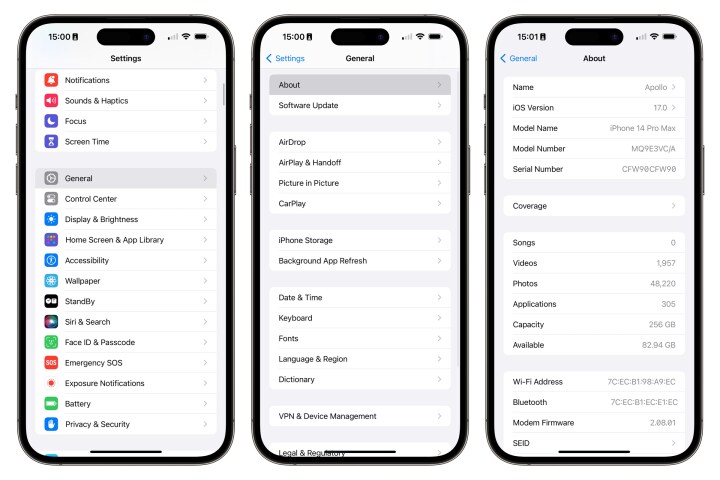
- Software settings: Open Settings → General → About. Scroll down until you see “Model Number.” Tap it once to reveal the full code; tap again to display the version without the leading “A”.
Both methods show the same identifier, but the software view can be handy when the back is scratched or the case hides the engraving.
Decoding the HK Model Codes
Apple’s model numbers consist of an “A” followed by four digits. The digits encode generation, carrier compatibility, and regional variant. For Hong Kong models, the key indicator is the suffix “HK” that appears in the device’s regulatory information (found under Settings → General → About → Regulatory). However, the most straightforward clue is the specific range of numbers Apple assigns to Hong Kong releases.
Generally, you’ll see:
- iPhone 13 series: A2633, A2634, A2635 (HK versions carry “HK” in the regulatory section).
- iPhone 12 series: A2402, A2403, A2404.
- iPhone 11 series: A2221, A2223.
These numbers overlap with other Asian markets, so cross‑checking the “HK” suffix remains essential.
Common Hong Kong iPhone Model Numbers
Below is a quick reference for the most recent models sold officially in Hong Kong. Keep in mind that older devices may share the same code with neighboring regions, but the “HK” regulatory tag will still be present.
- iPhone 14 Pro Max: A2894 (HK)
- iPhone 14 Pro: A2893 (HK)
- iPhone 14 Plus: A2892 (HK)
- iPhone 14: A2891 (HK)
- iPhone SE (3rd gen): A2833 (HK)
- iPhone 13 mini: A2633 (HK)
- iPhone 13 Pro: A2636 (HK)
- iPhone 12 Pro Max: A2410 (HK)
- iPhone 11: A2221 (HK)
If your device’s model number isn’t listed, a quick search on Apple’s support site using the “A‑” code will confirm its regional designation.
Tips for Verifying Authenticity and Avoiding Counterfeits
Even with the correct model number, a phone could be a refurbished unit from another market that was re‑branded. Here are a few practical checks:
- Compare the IMEI (found under Settings → General → About) with the one printed on the device’s original box. The first eight digits encode the manufacturing location; HK devices start with “01” or “02”.
- Inspect the packaging for “Hong Kong” printed on the label and the appropriate power adapter (Apple’s Hong Kong chargers use a Type G plug).
- Run Apple’s Check Coverage tool. If the serial number registers as sold in Hong Kong, you’re likely looking at the genuine version.
What to Do If Your iPhone Isn’t Marked as HK
Discovering that your iPhone lacks the Hong Kong identifier can be disappointing, but it isn’t always a deal‑breaker. Most cellular carriers in Hong Kong support the same bands as the local models, especially for newer generations. If you need full compliance—say, for warranty claims—consider contacting Apple Support with your serial number; they can sometimes re‑issue a regional warranty or guide you through a trade‑in.
FAQ
What does the “HK” in iPhone model numbers indicate?
It signals that the device was manufactured for sale in Hong Kong, reflecting specific regulatory approvals, power‑plug standards, and often a wider LTE band support.
Can I change a Hong Kong iPhone to a different region?
Apple does not provide an official way to “re‑region” an iPhone. You can use any carrier that operates on compatible frequencies, but warranty coverage remains tied to the original market.
How to tell if my iPhone is a genuine Hong Kong version?
Verify the model number, check for the “HK” tag in the regulatory information, match the IMEI to a Hong Kong‑issued block, and confirm the serial number on Apple’s coverage checker.