Mastering Supabase Auth: A Deep Dive into Refresh Tokens
When working with Supabase Auth, mastering refresh tokens is essential for building secure, long‑lived user sessions. These short, opaque strings let your application request new access tokens without forcing users to sign in repeatedly. This guide walks through why refresh tokens matter, how Supabase implements them, and best practices to keep your app both user‑friendly and secure.
Understanding Supabase Auth and the Role of Refresh Tokens
Supabase Auth follows the OAuth 2.0 framework, offering both access and refresh tokens. The access token, typically a JWT, carries the user’s identity and is used for every protected API call. Its lifespan is intentionally short—often a few minutes—to reduce the risk if it leaks. The refresh token, on the other hand, is long‑lived, stored securely on the client, and can be exchanged for a fresh access token when the old one expires.
Because the access token is sent with every request, an attacker who compromises it can impersonate a user instantly. In contrast, a stolen refresh token is less valuable: it can only be used to obtain new access tokens, and many services (Supabase included) add throttling and revocation mechanisms.
How Supabase Issues and Stores Refresh Tokens
- During Sign‑In: When a user logs in, Supabase returns both tokens in a single JSON payload. The client stores the access token in memory or a short‑lived store, and the refresh token in a secure cookie or encrypted storage.
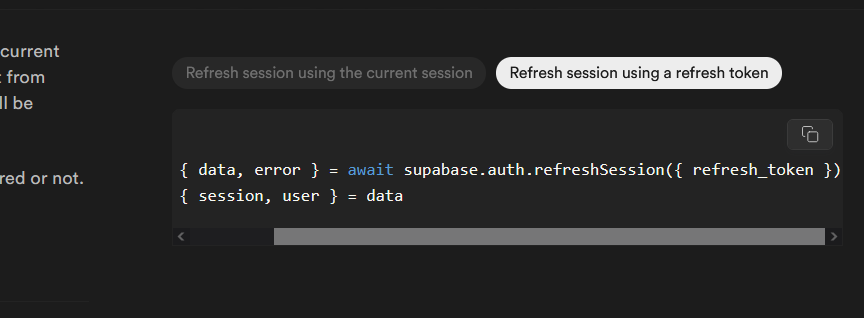
- Token Refresh Flow: Before the access token expires, the client sends the refresh token to the
/auth/v1/tokenendpoint, requesting a new access token. Supabase responds with a fresh access token—and optionally a new refresh token if rotation is enabled. - Rotation and Revocation: Supabase supports rotating refresh tokens, meaning each refresh consumes the previous token. This prevents replay attacks. Revocation can be triggered via the admin panel or API, instantly invalidating a refresh token.
Best Practices for Secure Refresh Token Handling
Even with built‑in protections, developers still need to adopt secure patterns. Below are the most effective habits:
- Store Refresh Tokens Securely: Use HttpOnly, Secure cookies or platform‑specific keychains. Avoid localStorage or plain text files.
- Implement Short‑Lived Access Tokens: Keep the access token lifetime as brief as your application can handle, typically 5–15 minutes.
- Use HTTPS Everywhere: Transporting tokens over plain HTTP exposes them to eavesdropping.
- Enforce Rotation: Enable Supabase’s token rotation so that each refresh consumes the previous token. This limits the window an attacker can reuse a stolen token.
- Set Expiration and Revocation Policies: Define a maximum age for refresh tokens and revoke them on password changes or suspicious activity.
- Limit Token Scope: Where possible, use scopes to restrict what a token can access. Supabase allows custom claims in the JWT for finer control.
Integrating Refresh Tokens into Your App Flow
Below is a typical high‑level flow for a client‑side application. Adapt the steps to your language or framework as needed.
- Initial Sign‑In: Capture the returned access and refresh tokens. Store them per the secure storage guidelines.
- Token Expiry Check: Before each API call, verify that the access token is still valid. If it’s about to expire (or has expired), trigger a refresh.
- Refresh Call: Send the refresh token to
/auth/v1/tokenwith thegrant_type=refresh_tokenparameter. Handle the response by updating both tokens. - Error Handling: If the refresh fails (e.g., token revoked), log the user out and prompt a fresh sign‑in.
- Graceful Expiry: On app startup, check whether the refresh token is still valid. If not, clear local storage and redirect to the login page.
Monitoring and Logging Refresh Token Usage
Visibility is key to security. Supabase provides audit logs that record when refresh tokens are used. Review these logs periodically for unusual patterns—multiple refreshes in a short span, requests from unfamiliar IP addresses, or repeated failures. If anomalies surface, consider temporarily revoking the offending token and alerting the user.
Common Pitfalls to Avoid
- Storing Refresh Tokens in Local Storage: Local storage is vulnerable to XSS attacks. Stick to HttpOnly cookies or secure keychains.
- Ignoring Rotation: If you disable rotation, a stolen refresh token remains valuable indefinitely. Enable it unless you have a compelling reason not to.
- Long‑Term Stale Tokens: Tokens that live for months or years increase the attack surface. Set a reasonable maximum age and enforce revocation on password changes.
- Failing to Handle Token Refresh Failures: An unhandled refresh error can leave your app in a broken state. Always catch errors and clear stale tokens.
FAQ
How long does a refresh token last in Supabase? Supabase defaults to a 30‑day lifespan, but this can be configured in the project settings.
Can I force a refresh token to rotate manually? Yes—by sending a refresh request, Supabase will issue a new token pair and invalidate the old refresh token if rotation is enabled.
Is it safe to store