Understanding IP Address Filtering: How It Works and Why It Matters
When you hear “IP address filtering,” you might picture a network admin typing cryptic commands into a console. In reality, the concept is surprisingly straightforward: it’s a method of allowing or blocking traffic based on the numeric address assigned to each device on a network. By comparing incoming or outgoing packets against a list of permitted or denied addresses, systems can enforce simple yet powerful access controls.
What Is IP Address Filtering?
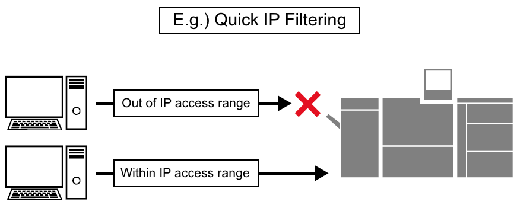
At its core, IP address filtering is a rule‑based approach to network security. Each device that communicates over the internet or a local network carries an IP address—think of it as a digital mailing label. A filter examines these labels and decides whether the packet should pass through. The filter can be set to allow only certain addresses (a whitelist) or block specific ones (a blacklist). This decision can happen at the router, firewall, web server, or even within an application.
How Does IP Filtering Actually Work?
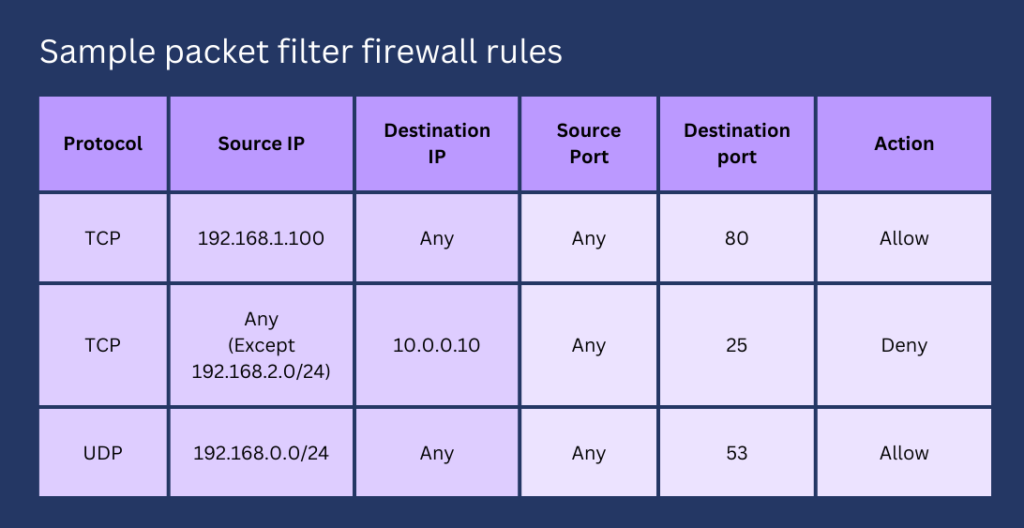
When a packet arrives at a device with filtering enabled, the system checks the packet’s source or destination IP against its rule set. If the address matches an “allow” entry, the packet proceeds; if it matches a “deny” entry, the packet is dropped or rejected. The process is typically fast because it involves a simple lookup, often stored in memory for quick access.
Filters can be static—where the list is manually curated—or dynamic, updating automatically based on threat feeds or user behavior. Some implementations also support CIDR notation, allowing administrators to block entire subnets (e.g., 192.168.1.0/24) rather than individual addresses.
Common Use Cases for IP Filtering
- Geographic restrictions: Companies may block IP ranges associated with countries where they don’t conduct business, reducing exposure to regional attacks.
- Brute‑force protection: After multiple failed login attempts, a server can temporarily block the offending IP to thwart automated attacks.
- Corporate network segmentation: Internal firewalls often permit only known office IPs to access sensitive services like internal portals or databases.
- Content delivery control: Streaming platforms sometimes limit access to certain IP ranges to comply with licensing agreements.
Pros and Cons of Relying on IP Filtering
Like any security tool, IP address filtering has strengths and weaknesses. On the plus side, it’s easy to configure, requires minimal processing power, and offers an immediate barrier against obvious threats. However, determined attackers can bypass filters by using VPNs, proxy servers, or botnets that rotate IPs, rendering static blacklists less effective.
Another limitation is the reliance on IP addresses, which don’t always map cleanly to individual users. In large corporate environments, many employees share a single public IP, making granular control difficult. Conversely, mobile users often receive dynamic IPs that change frequently, potentially leading to unintended blocks.
Best Practices for Implementing IP Filtering
To get the most out of IP filtering without creating bottlenecks, follow these guidelines:
- Combine with other controls: Use IP filtering alongside authentication, encryption, and intrusion detection for layered security.
- Prefer whitelists for critical assets: When protecting high‑value services, allow only known, trusted IPs rather than trying to block everything else.
- Regularly review and update lists: Threat landscapes evolve; schedule periodic audits to prune obsolete entries and add new safe ranges.
- Log blocked attempts: Keep detailed logs to spot patterns, such as repeated attacks from a particular region, which may inform broader security policies.
- Test before deployment: Apply filters in a staging environment or use a “monitor‑only” mode to ensure legitimate traffic isn’t inadvertently cut off.
When IP Filtering Isn’t Enough
For organizations facing sophisticated threats, relying solely on IP filtering can give a false sense of security. Modern attackers often route traffic through cloud services that mask their true origin, making IP‑based decisions unreliable. In such cases, behavior‑based analytics, multi‑factor authentication, and zero‑trust network architectures provide stronger, more adaptable defenses.
FAQ
Q: Can I block a single device on my home network using IP filtering?
A: Yes. Most consumer routers let you add the device’s internal IP (e.g., 192.168.0.45) to a block list, preventing it from accessing the internet or other devices on the LAN.
Q: Does IP filtering affect HTTPS traffic?
A: It does, but only at the network layer. The filter sees the IP address before the encrypted payload is decrypted, so the decision is made regardless of the protocol being used.
Q: How often should I update my IP blocklists?
A: There’s no one‑size‑fits‑all schedule, but a quarterly review is a good baseline. If you rely on threat‑intelligence feeds, those updates can be automated daily.
Q: Are there legal concerns with geo‑blocking IP ranges?
A: In most jurisdictions, blocking traffic based on location is permissible, but it’s wise to check local regulations, especially if you’re providing essential services that could be deemed discriminatory.