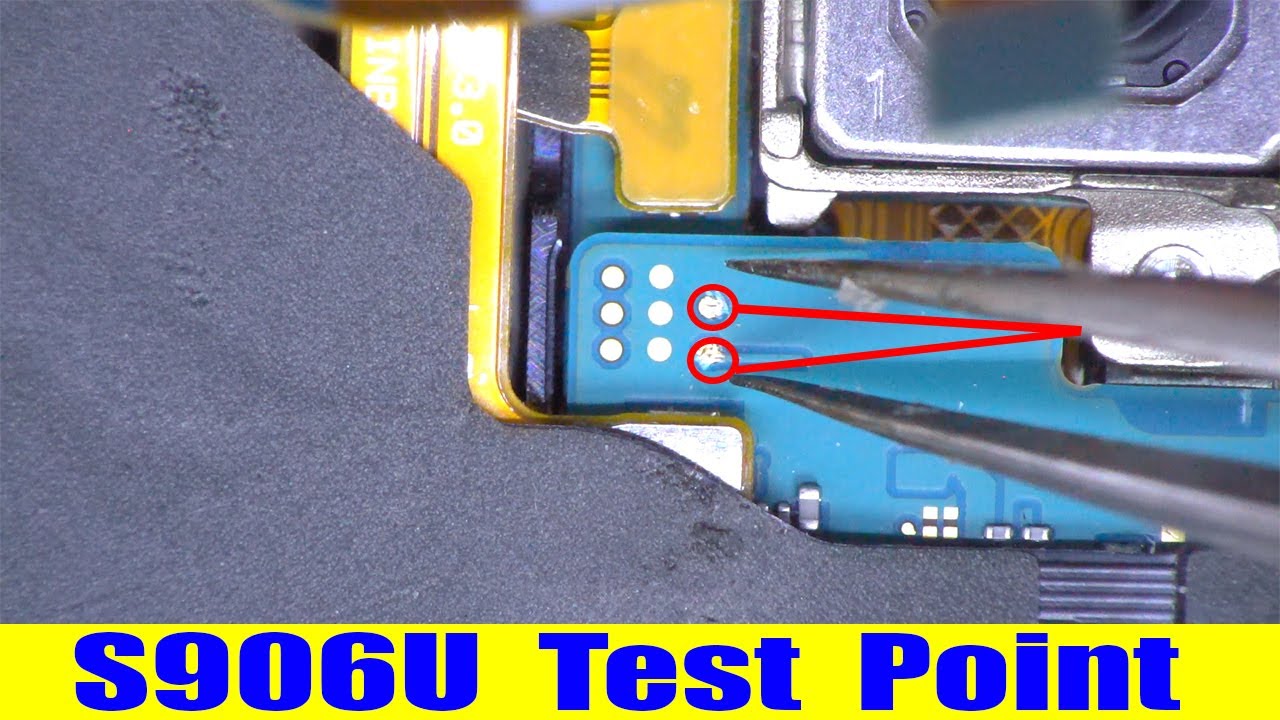
Unlocking Samsung S22 Secrets Using Test Points
When a Samsung S22 gets stuck in a boot loop, refuses to boot, or locks you out of your own device, the instinct is usually to reach for software fixes. But sometimes the solution lies in a tiny, often invisible spot on the device’s motherboard: a test point. Test points are tiny solder pads that engineers use to probe circuitry during manufacturing and repair. With a bit of know‑how and the right tools, they can help you unlock, recover, or reflash your S22 in ways that bypass typical software restrictions.
What Are Test Points?
In the world of electronics, test points are deliberate gaps or pads on a printed circuit board (PCB) where technicians can connect probes to read or manipulate signals. On a smartphone, they serve as access points to critical functions such as bootloader selection, power‑on sequences, and recovery modes. For most users, these pads are hidden under layers of metal and plastic, but with a magnifying glass and a bit of patience, they can be located on the S22’s main board.
Locating Test Points on the Samsung S22
Finding the right test point is the first step. Here’s how to do it safely:
- Consult the service manual. Samsung publishes detailed disassembly guides for each model. The S22 manual lists test point names (e.g., TP_BOOT, TP_BATT) and their positions.
- Open the case carefully. Remove the rear panel, the battery, and the rear camera assembly. You’ll see a thin metal plate covering the motherboard—lift it with a flat‑edge tool.
- Use a magnifier. The pads are tiny (about 0.2 mm) and may be obscured by dust or solder residue. A jeweler’s loupe or a 20× magnifying glass works well.
- Verify with a multimeter. Test the continuity between the pad and the ground or the power rail to confirm you’ve identified the correct point.
Unlocking the Device: A Step‑by‑Step Guide
Once you’ve pinpointed the test point, you can trigger hidden states in the firmware. The exact procedure depends on which lock you’re trying to bypass. Below is a general approach for unlocking a bootloader or resetting a locked screen.
- Power off the S22. Hold the power button until the screen turns off. If the device is frozen, remove the battery if it’s removable, or use a small screwdriver to disconnect the battery connector for a few seconds.
- Connect the probe. Using a thin, insulated needle or a pair of tweezers, touch the identified test point and simultaneously ground the pad or apply a short voltage. For bootloader unlocking, you’ll usually short TP_BOOT to ground while the device is off.
- Power on the device. While maintaining the short, press the power button. The firmware should detect the test point input and enter a special mode—often a recovery or bootloader screen that bypasses the lock.
- Follow on‑screen prompts. Once in the correct mode, use the volume keys to navigate and the power button to confirm actions. You can now flash a new ROM, unlock the bootloader, or reset the device entirely.
- Disconnect and restore. After the operation, remove the probe, power down, re‑connect the battery, and reboot normally.
Because each S22 variant may use a slightly different test point scheme, it’s essential to verify the point’s function before applying power. A wrong short can permanently damage the board.
Risks and Precautions
Working with test points is not a “no‑risk” activity. Here are key safeguards:
- Warranty void. Samsung does not support hardware tinkering. Any accidental damage will likely void your warranty.
- Electrical shock. The motherboard can hold up to 12 V on some rails. Use insulated tools and avoid touching exposed pads when power is on.
- Short‑circuit damage. A mis‑directed probe can fry chips or break the PCB. Keep your movements deliberate and avoid repeated shorts.
- Professional help. If you’re unsure, seek assistance from a certified service center.
Alternative Unlock Methods
If the test point approach feels too risky, there are software‑centric alternatives:
- Recovery mode via hardware keys. Hold Volume Down + Power to access recovery, then wipe cache or install a custom ROM.
- Samsung Find My Mobile. With a linked Samsung account, you can unlock the phone remotely or wipe data.
- Fastboot commands. Once the bootloader is unlocked, use fastboot oem unlock or fastboot flash boot to flash recovery or a custom kernel.
- Third‑party unlockers. Tools like Odin can flash official firmware if you have the correct *.tar files.
FAQ
What is the difference between a test point and a pinhole?
A test point is a solder pad specifically designed for diagnostic access, whereas a pinhole may be a generic opening. Test points are labeled in service manuals, making them easier to identify.
Can I unlock the S22 using test points if my device is factory‑locked?